How to Download TikTok Story
-
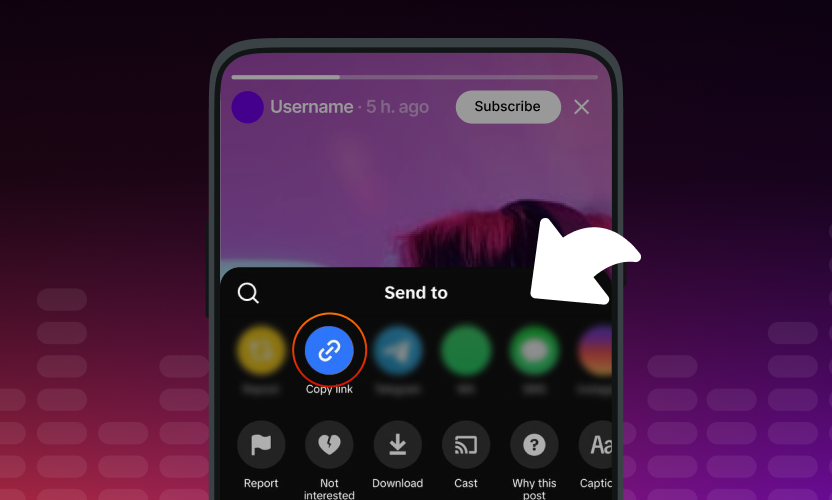
Copy the Story Link
Open the TikTok story you want to save and tap «Share» → «Copy Link».
-
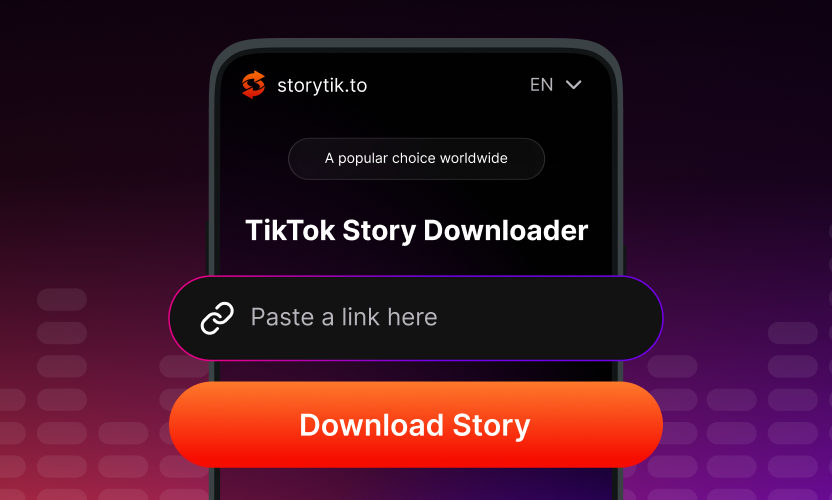
Paste at storytik
Open storytik and paste the story link into the input field.
-
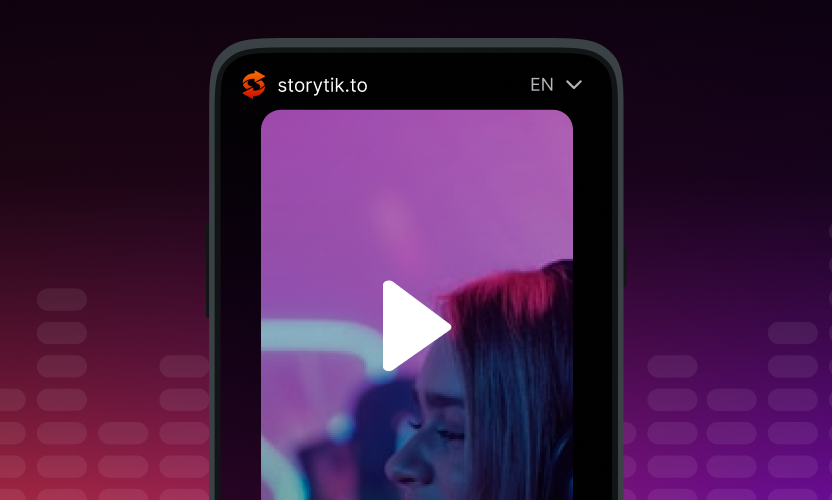
Download the TikTok Story
Click «Download» — the story saves to your device instantly, no watermark.


How to Download TikTok Story on iPhone
- Open TikTok, find the story you want, tap «Share» and choose «Copy Link».
- Open Safari and go to storytik.to. Paste the link into the field.
- Tap «Download» and save the story to your Files app or Photos.
How to Download TikTok Story on Android
- In TikTok, open the story and tap «Share» → «Copy Link».
- Open any browser, go to storytik.to, and paste the link.
- Tap «Download» — the story lands in your Downloads folder.
How to Download TikTok Story on Desktop
- Open the TikTok story in your browser and copy the URL from the address bar.
- Go to storytik.to and paste the link into the field.
- Click «Download» to save the story to your computer.
-
Why Download TikTok Stories with storytik

TikTok stories are built to expire: 24 hours after posting they are gone, whether anyone saved them or not. storytik exists for that window. Paste a direct link to any public story and keep a copy before TikTok clears it. Creators archive their own posts this way. Marketers pull competitor stories for research and mood boards. Plenty of people simply save the moments they love from creators they follow, the spontaneous, unfiltered stuff that never makes it into a regular video.
Downloaded stories keep the original resolution and aspect ratio, with no watermark burned in. The files play natively on iPhone, iPad, Android, Windows, Mac, Linux, and ChromeOS. Everything happens in the browser, so there is nothing to install and no account to create. Paste a link, tap download, keep the story.

Why Choose Our TikTok Story Downloader?
Download high-quality TikTok stories instantly by link.
Fully secure and browser-based.
-

Unlimited Story Downloads
There are no daily caps or login walls, and no captcha shows up after the tenth story. Use storytik a hundred times a day without throttling.
-

Original Quality, No Watermark
Stories come down at the resolution the creator uploaded, without the TikTok logo stamped over the frame. The file is ready for an editor or a re-upload right away.
-

Privacy-Friendly
We do not ask for a sign-up or an email, and no cookie ties a download to your identity. storytik does not log the links you paste; downloaded files never touch our servers.
-

Three Taps to Save
Copy the story link, paste at storytik.to, tap Download. Works on iPhone, Android, Windows, Mac, Linux — anywhere with a modern browser.
About storytik
storytik (storytik.to) is a free browser-based tool for downloading TikTok stories. Paste a story link, tap Download, and the file saves directly to your device with no watermark, no login, and no tracking.
Built and maintained by a small team of developers focused on browser-based media utilities. We believe public content should remain accessible without sacrificing user privacy, so storytik creates no accounts, keeps no logged sessions, and collects no data.
All downloads keep the original TikTok resolution and aspect ratio, with the TikTok watermark removed. Whether you're archiving your own stories or saving favorites from creators before they expire, storytik keeps it quick. If you have any questions or feedback, contact us at [email protected].
What Users Say About storytik
-

emj_clover
February 2026
Really convenient — saved a TikTok story in just a few seconds. I use it whenever a creator I follow drops a good story I want to keep.
-

a2
February 2026
I love how straightforward everything is. I often need to grab TikTok stories for competitor research: paste the link, get the file, done. No ads, no pop-ups, no sign-ups. I've been using it for weeks without a single issue.
-

Sofia
January 2026
Didn't expect story downloads to be this simple 🤩 Fast, free, and super smooth. Now I can save my favorite stories before they expire.
-

Dan
January 2026
I honestly expected ads or restrictions, but everything worked perfectly. Clean files, no glitches, no hidden limits, and — best part — no TikTok watermark.
-

Raj P
December 2025
One-click story downloads, no complications. I save family and friends stories before they disappear from TikTok.
-

Hanna
December 2025
I save stories from dance creators for practice reference. I'm not very tech-savvy, but it worked perfectly on the first try.
-

Marcus Rossi
November 2025
Great for archiving my own TikTok stories. Quality is excellent, resolution is preserved, and downloads are fast on my phone.
-

ellie_alvrs
November 2025
I use it for yoga and meditation creators — grab their tips before stories expire. Downloads are quick and the quality stays surprisingly good.
-

Liam O'Connor
October 2025
Fast downloads, no problems with the site.
-

Christopher
October 2025
I grab TikTok stories for reference content. Quality is solid — no artifacts, no weird compression, no watermark.
-

Megan Carter
September 2025
My teenager keeps showing me TikTok stories from friends — now I can save them easily to watch later on the couch.


Frequently Asked Questions
-
Is it legal to use a TikTok story downloader?
Downloading TikTok stories for personal use — offline viewing, saving stories you like, keeping a private archive on your phone or laptop — is generally fine in most jurisdictions and falls under fair-use principles. TikTok's own app also lets you save many stories, so keeping a copy for yourself is not the issue. The line to watch is what you do next. Reuploading someone else's story to your own account, monetizing it, or passing it off as your own creation moves you into copyright territory. That is on you, not on the tool. If you re-share a downloaded story anywhere public, credit the original creator with their @username and link to the source. Do not download private or restricted content. storytik works only with public TikTok stories and stores nothing on our side; we do not keep the file after you save it.
-
Does the downloader keep the original story quality?
Yes. storytik pulls the original file that TikTok serves, up to the highest resolution the creator uploaded. Nothing is re-encoded or re-compressed on our side, so you get the same bitrate, codec, and aspect ratio (typically vertical 9:16 for stories) that TikTok itself uses. The output plays anywhere: the native gallery on Android and iPhone, VLC, QuickTime, and every desktop media player. It also drops straight into editors like Adobe Premiere, CapCut, DaVinci Resolve, iMovie, and Final Cut Pro without a conversion step. And the file comes down without the TikTok watermark, so it is ready for editing or reposting on other platforms.
-
Do I need a TikTok account?
No account, no login, no password. storytik takes a public TikTok story URL and returns the file — that is the entire flow. You never sign in to TikTok through us, and we never ask for TikTok credentials. This matters for two reasons. First, privacy: nothing links the download to your TikTok identity, so your For You page, watch history, and Following list stay untouched. Second, safety: you never hand your TikTok password to a third-party site, which is the usual way accounts get hijacked. The only thing that will not work is private stories, friends-only content, and posts from accounts you were blocked by, because those are not public. Anything you can open in an incognito browser tab without logging in, storytik can download.
-
Why does it say the download link was not found?
Nine times out of ten the story has already expired. TikTok removes stories 24 hours after posting, and once TikTok stops serving a story publicly, no downloader can fetch it — storytik can only save what is still live. The same error appears for private accounts, friends-only stories, and region-locked posts. If the story is definitely public and less than a day old, check that the link copied completely (it should contain the creator's @username and a long numeric ID) and try again.
-
Can I use the downloader on iOS?
Yes, storytik works on iPhone and iPad through Safari, Chrome, or any browser you have installed. No App Store download, no configuration profile, no shortcut to import. Open TikTok, tap «Share» on the story you want and copy the link, then paste it into storytik in your browser. Tap the download button and Safari will ask where to save the file — pick Files, iCloud Drive, or your Photos library. From Files, the story is ready to AirDrop, attach to Messages or Mail, import into CapCut or iMovie, or upload to Instagram, YouTube Shorts, or a Google Drive folder. Everything happens in your browser and on your device; storytik does not store the file after you save it.
-
Do the downloaded stories have the TikTok watermark?
No. When you save a story through the TikTok app itself, TikTok often stamps a visible logo and the creator @username onto the file, and the watermark drifts around the frame so you cannot crop it out cleanly. That watermark makes the story look like a re-upload the moment you post it anywhere else — Instagram Reels and YouTube Shorts actively demote content with competitor watermarks. storytik pulls the clean source file, so what you get is the raw story with no logo overlay. That is what makes the file usable in a video editor, in a Reels or Shorts upload, in a client presentation, or in an archive. Original resolution and aspect ratio stay intact; only the watermark is gone.
-
Is there a daily download limit?
No. storytik is free and unlimited: download one TikTok story or a hundred in the same session, and nothing throttles you. There is no daily quota, no premium tier, and no signup wall that unlocks extra downloads. You do not create an account, so there is nothing to hit a limit against in the first place. The only practical ceiling is your own bandwidth and storage. If a specific URL fails, it is almost always because the story already expired, the account is private, or the region is locked — the tool cannot fetch what TikTok no longer serves publicly. We do not log which stories you download, and we do not tie usage to your IP or browser fingerprint.
-
Can I download TikTok stories on iPhone?
Yes, and it takes about ten seconds. Open the TikTok app and find the story you want. Tap the «Share» arrow, then «Copy Link» — TikTok will confirm the link is on your clipboard. Switch to Safari or Chrome, go to storytik.to, and paste into the input field (long-press, then «Paste»). Tap the download button. Safari will show a prompt asking where to save the file: choose Files, iCloud Drive, or Photos. The story downloads in seconds and appears in the location you picked, watermark-free, at the original resolution. From there you can open it in the Photos app, drop it into iMovie or CapCut for editing, AirDrop it to a Mac, or re-share it wherever you want. No app install, no login, no TikTok account required.
-
How do I save TikTok stories on Android?
The flow is nearly identical to iPhone. In the TikTok app, open the story and tap the «Share» icon. From the share sheet, tap «Copy Link»; you will see a small confirmation that the link was copied. Open Chrome, Samsung Internet, Firefox, or whichever browser you use, go to storytik.to, and paste into the field (long-press, then «Paste»). Tap download. Your browser will save the story to the Downloads folder — you can also open it directly from the notification that appears. Once saved, the story is in your gallery or Files app and plays in the default media player. You can trim it in CapCut, edit in Adobe Premiere Rush, upload to YouTube Shorts or Instagram Reels, or send it through WhatsApp or Telegram at original quality. Works on any Android version and any device: phone, tablet, or ChromeOS.
Ready to download TikTok stories?
storytik downloads public TikTok stories in three steps: copy the story link, paste it at storytik.to, tap Download. The story saves at original resolution, watermark-free, and nothing asks you to log in. Free for personal use; check copyright before sharing.
Download Story